




Many organizations first learn about the Active Directory (AD) Protected Users group during an external audit or penetration test. It often begins with an auditor asking, “Why haven’t you placed your most privileged accounts in the Protected Users group?” This question can feel accusatory and catch teams off guard. This reaction is understandable, but it doesn’t have to be the norm.
So why is this an issue? And what makes the Protected Users group so important?

What is the Active Directory Protected Users Group?
Partner with Microsoft experts you can trust
If it’s time to take that first step toward leveling up your organization’s security, get in touch with Ravenswood to start the conversation.
Microsoft introduced the AD Protected Users group as a feature in Windows Server 2012 R2 domain functional level (DFL), on the heels of the exploitation of the Windows Local Security Authority Subsystem Service (LSASS) process by researcher Benjamin Delpy and his Mimikatz tool. Benjamin discovered that the authentication process could be made easier for Active Directory users if Microsoft stored an encrypted copy of their password in memory. This enabled attackers to steal credentials from compromised computers and potentially move laterally inside the organization’s domain. Knowing that attackers may be able to utilize this tool to gather the credentials of highly privileged users inside of the domain, Microsoft developed the Protected Users group to provide protection against attacks such as these.
Members of the Protected Users group benefit from a range of device and domain authentication protections, as shown in Table 1, that help mitigate credential theft techniques such as Kerberoasting, NTLM Relay, and LSASS memory dumping. These protections include disabling RC4 and DES Kerberos encryption, blocking NTLM authentication, and preventing credential caching and delegation. While NTLMv2 and RC4 encryption remain in use across many environments, the Protected Users group offers a straightforward way to secure privileged accounts, without requiring extensive infrastructure changes, provided the domain meets minimum functional level requirements.
Table 1 – Protected Users group Protections
Requirements for Protected Users Group Protections
To ensure that the Protected Users group will fully secure its members and minimize disruption when accounts are added, it’s essential to understand and meet all the necessary prerequisites. These requirements include AES Kerberos encryption support, Kerberos authentication and device readiness to support the group’s advanced authentication protections.
AES Kerberos Encryption
Members of the Protected Users group must support AES (Advanced Encryption Standard) Kerberos encryption. This is supported after upgrading the Windows domain functional level (DFL) to Windows Server 2008 R2 or better, which also triggers an automatic reset of the KRBTGT service account password to generate AES-compatible keys.
However, even in domains that support AES, potential protected accounts may have been created before AES encryption was available. Administrators must rotate account passwords to ensure they can receive AES-encrypted Ticket Granting Tickets (TGTs) before being included in the Protected Users group.
Kerberos Authentication
Kerberos is the only supported authentication protocol for members of the Protected Users group. Therefore, it is essential that Kerberos authentication functions correctly within the domain, and that privileged users avoid using legacy protocols such as NTLM. Accurate time synchronization between clients and domain controllers is a critical component of Kerberos authentication. If a time skew exceeds the typical limit of five minutes, authentication requests will be rejected.
Before adding users to the Protected Users group, it’s essential to review your AD time hierarchy. Improper time synchronization in AD can result in Kerberos authentication issues. My colleague Tony La Grassa’s blog, In Sync: Proper Active Directory Time Sync Methods, offers valuable insights into the configuration steps needed to keep time consistently in sync across your environment.
While accurate time synchronization is essential for Kerberos authentication, establishing a secure channel is equally critical. Devices used by Protected Users must be domain-joined, and if authentication occurs across a trust, that trust must support Kerberos authentication using AES encryption. Fortunately, following the successful application of November 8, 2022—KB5019980 (OS Build 22621.819), AES is now the default encryption type for Kerberos referral tickets used across trusts, making manual enablement of AES for trusts unnecessary. However, some trust types, such as external trusts, do not natively support Kerberos authentication or AES encryption, which may result in authentication failures.
Device Requirements
While domain-level protections from the Protected Users group apply to all authentication attempts once an account is added to the group, device-level protections only take effect on compatible devices. This means that to fully benefit from the group’s safeguards, devices must support the required security features and configurations. To support Protected Users group device protections, workstations must run Windows 10 or later, and servers must run Windows Server 2012 R2 or later. These operating systems provide the necessary security features to enforce protections such as blocking credential caching and disabling insecure encryption protocols.
As a result, device-level protections do not apply to non-Windows clients. These systems will only benefit from the domain-level protections that apply to all authentication attempts, regardless of device compatibility.
Accounts to Consider for Inclusion in Protected Users Group
To maximize security and minimize risk, we recommend adding only named individual user accounts, specifically those belonging to administrators managing AD infrastructure, to the Protected Users group. You should exclude service accounts and computer accounts, as they may not support the group’s protections and could experience authentication issues. Additionally, the strict restrictions imposed by the Protected Users group will cause authentication and application issues for user accounts. Therefore, it is not a viable solution for securing other high-value target accounts that lack elevated privileges.
The term “AD privileged groups” refers to the default set of high-privilege groups in Active Directory. These are sometimes called “protected groups” because their permissions are automatically enforced by a background process called SDProp (Security Descriptor Propagator), which ensures consistent and secure access control settings across the domain.
We do not recommend that you place service accounts in privileged groups. If a service is a member of a privileged group, it should not be added to the Protected Users group. Strict security policies such as short Kerberos TGT lifetimes and disabling Kerberos delegation—enforced by the group—can disrupt the functionality of service accounts that rely on long-lived sessions or delegation for authentication. For organizations requiring more granular control over service account authentication behavior, an authentication policy silo can provide targeted restrictions without the broader limitations of the Protected Users group.
Implementing the Protected Users group is a strategic moment to review your privileged users and groups. This review helps ensure that the correct individuals have elevated access and that your AD environment remains secure and manageable. In his video, How to Review Your Privileged Users and Groups, Brian Desmond answers some key questions about the process, including:
- How many people should you have in privileged groups?
- Should you include service accounts in privileged groups?
- What is an AdminSDHolder and how you should monitor it?
Completing this review process not only strengthens your overall security posture but also helps identify and document a clear list of eligible candidates for inclusion in the Protected Users group.
Preparing for Implementation of Protected Users Group
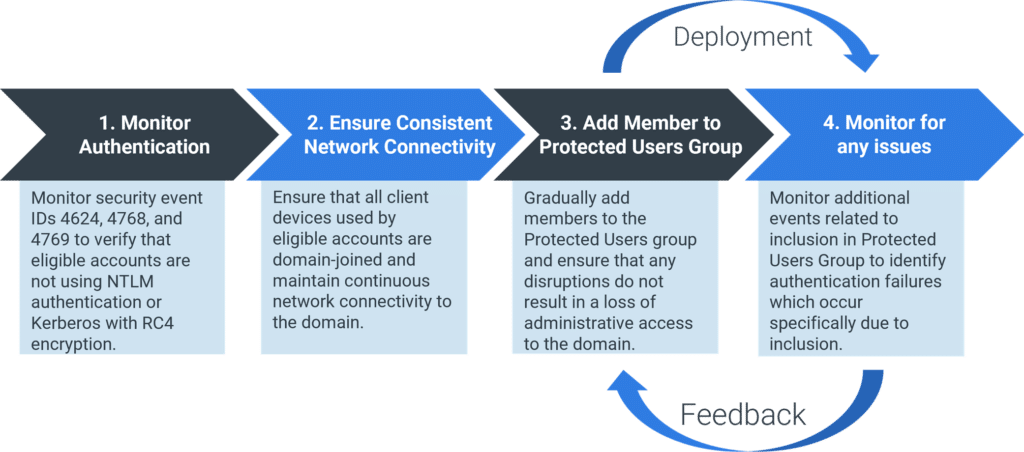
After identifying eligible candidate accounts through your privileged access review, it’s critical to evaluate potential impacts before their inclusion in the Protected Users group. The evaluation process shown in Figure 1 ensures that the group’s strict authentication policies, such as the requirement for AES-encrypted Kerberos tickets and the elimination of NTLM authentication, do not interfere with normal operations or inadvertently cause authentication failures or account lockouts. Performing this assessment helps maintain both security and usability, especially accounts that support critical infrastructure or rely on legacy authentication behaviors.
Protected Users Group Implementation Process
Monitor Authentication
The successful implementation of the Protected Users group begins with monitoring authentication attempts for all eligible accounts, illustrated in step 1 of Figure 1. This involves auditing security Event IDs 4624, 4768, and 4769 to ensure that accounts do not rely on NTLM authentication or Kerberos with RC4 encryption:
- Event 4624: Review the Authentication Package field to confirm that NTLM is not being used.
- Event 4768 and 4769: Confirm that the encryption type used for Kerberos ticket request and service ticket issuance is not RC4.
Kerberos authentication requires a secure channel to complete the TGT request, therefore it is essential that all client devices used by potential protected accounts are domain-joined. These devices must maintain continuous connectivity to the domain to ensure successful authentication. When authentication occurs across a trust, it is equally important to verify that Kerberos with AES encryption is supported between the trusted domains. Without this support, Protected Users group members will experience authentication failures when authenticating across the trust.
Implementing effective monitoring and validation of these conditions helps prevent disruptions and ensures that privileged users can perform their duties without encountering unexpected access issues, specifically related to the prohibition of NTLM and Kerberos RC4 encryption. Organizations that have deployed Microsoft Defender for Identity can leverage its advanced monitoring capabilities to detect and alert on suspicious authentication patterns during this phase.
Ensure Consistent Network Connectivity
With client-side caching disabled, it’s essential to validate network connectivity for all client devices used by members of the Protected Users group. Additionally, because Kerberos authentication requires continuous domain connectivity, it’s important to ensure that domain access is maintained throughout the entire logon process. This is especially critical for Privileged Access Workstations (PAWs), which may depend on VPN connectivity to remain connected to the privileged network.
Add Members to Protected Users Group
Following successful completion of step 2 of Figure 1, sufficient preparatory work will have been completed to begin gradually adding members to the Protected Users group. Gradually adding members to the Protected Users group is essential, particularly for those accounts with highly privileged access, to prevent unforeseen complications from simultaneously impacting authentication across all accounts. Such issues could result in loss of domain management capabilities. These privileged users are subject to the same restrictions imposed by the Protected Users group. The potential for account lockout remains if an unforeseen conflict arises that affects authentication. For this reason, gradual inclusion and thorough testing between each addition are strongly recommended.
Monitor for Any Issues
Effective monitoring, step 4 of Figure 1, after each member is added to the Protected Users group, helps minimize potential impacts and enables accurate attribution of any unexpected authentication issues. This reduces confusion during the deployment phase and supports a smoother rollout. To assist with accurately determining if an authentication failure is related to Protected Users group, additional operational administrative logs can be enabled on clients and domain controllers. The logs below in Table 2 can be enabled on the appropriate target to assist with troubleshooting authentication issues.
Table 2 – Protected Users group Logs
These logs provide insight into potential authentication issues related to the Protected Users group. For more information, this Microsoft article provides details about related event IDs: Protected Users Security Group in Windows Server | Event Logs.
Effective monitoring supports the feedback loop during the deployment phase by enabling the integration of insights gathered to assist with onboarding future members.
Conclusion
Adding members to the Protected Users group is more than a compliance checkbox for an upcoming audit. Any change that could impact authentication for the domain’s most privileged accounts demands careful planning and execution. While changes affecting privileged accounts must be handled with care, the advantages of the Protected Users group extend well beyond audit compliance. The Protected Users group helps safeguard valuable credentials from being harvested and exploited by malicious actors, without requiring large-scale changes to the environment, offering a simplified approach to security.
To help you effectively manage your Protected User groups, I’d suggest that you consider using our Active Directory Health Check (ADHC), which provides expert guidance on the topic. We know that interpreting the results from an AD assessment such as our ADHC can raise questions, and we’re here to help you understand the results. Our goal is to make you feel confident in addressing any findings and know you have a trusted partner to provide clarity when needed.