

Over time, many organizations accumulate an excessive number of Group Policy Objects (GPOs). While many GPOs may remain in active use, a significant portion inevitably become obsolete. While unused GPOs might be viewed as harmless clutter, they can negatively impact performance and the overall user experience.
To understand the risks associated with unused or poorly managed policies, it is important to first understand what Group Policy is and how it is used.

What is Group Policy?
Group Policy is a mechanism for administering settings and maintaining consistent user and computer configuration on computers running Windows operating systems. While Group Policy is often associated with GPOs, which are Active Directory (AD) objects containing collections of policy settings, it also includes local policy settings which are stored directly on individual systems and managed through the Local Group Policy Editor. Unlike GPOs, these policy settings are not stored in AD and cannot be centrally managed.
What is a Group Policy Object and Group Policy Link?
While Microsoft Intune has become a leading solution for modern device management, most organizations still administer their fleet through Group Policy or a hybrid approach using Group Policy and Intune. Historically, organizations may have relied on Group Policy due to configuration options unavailable in Intune.
That said, the ability to import an administrative template into Intune enables more granular control over Windows device settings, bringing its capabilities closer to those of traditional Group Policy. (Note: My colleague Adam Zucker describes that topic in more detail in his blog post Managing ADMX Template Updates in Microsoft Intune.)
Group Policy Objects
Despite these advancements, many organizations are still dependent on Group Policy as their primary method of client management. In such environments, GPOs provide a straightforward and centralized method for configuring and applying Group Policy settings at scale. Unlike Local Group Policy, which stores configuration data on the local file system, GPOs store their settings within the domain’s SYSVOL share, allowing them to be accessed and applied consistently by all domain-joined clients. Managing Group Policy across a large environment is most effectively done through the Group Policy Management Console (GPMC), which gives administrators a unified view of all GPOs, links, and inheritance across the domain.
Group Policy Links
Domain-joined client computers will not process a Group Policy until they are within scope, which occurs when the computer or user object receives the policy through a Group Policy link. Group Policy links can be applied to Organizational Units (OUs), Sites, or the Domain.
Group Policy Processing Order
When applied with default inheritance, GPOs are processed in the following order, determined by their Group Policy Links. Figure 1 illustrates how conflicting policy settings are handled, commonly referred to as the LSD OU rule.
- Local Group Policy is processed first; consequently, when a computer is joined to a domain, any conflicting Local Group Policy settings are overwritten by settings defined in domain-based GPOs that are processed later.
- Site policy is processed next, following the order of inheritance for that Site.
- Domain policy follows, according to the order of inheritance for the domain head object. It is worth noting that critical baseline controls — such as a password policy enforced by a domain admin — are typically applied at this level to ensure consistent coverage across all domain-joined systems.
- Finally, policies linked to the OU containing the object, including child OUs, are processed. When the object is nested the policy linked closest to the object will process last, following the order of inheritance for that OU.
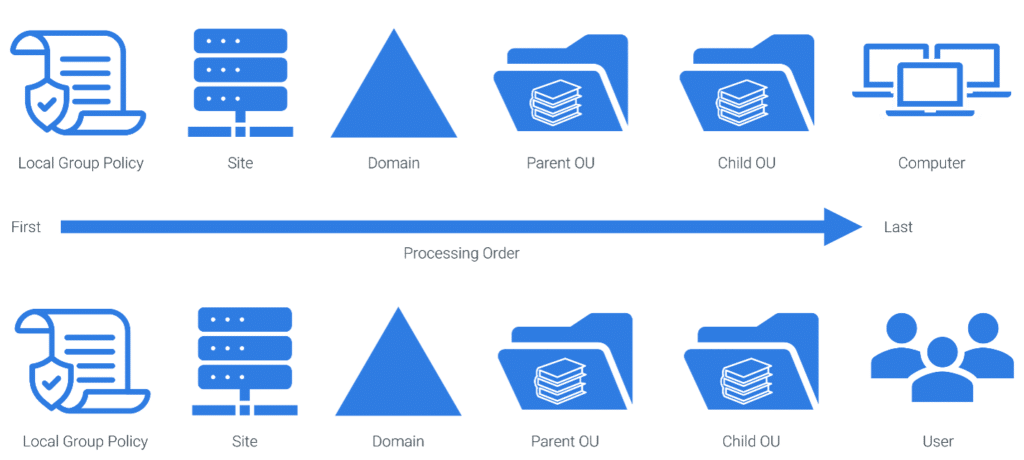
Figure 1 Group Policy Processing Order
Group Policy Best Practices
Partner with Microsoft experts you can trust
If it’s time to take that first step toward leveling up your organization’s security, get in touch with Ravenswood to start the conversation.
While GPOs provide administrators with a wide range of configuration options, this flexibility can lead to management and troubleshooting challenges. Certain configurations may introduce complications, which may result in unexpected behavior, such as a group policy setting not being applied as intended. This can further complicate policy processing investigations and result in systems being placed in an unintended configuration, which may contribute to a weakened security posture. Adhering to the best practices outlined below can help mitigate issues before they result in service impacting events.
Establish a Naming Standard
An effective naming standard should clearly reflect the administrative tier, target object type, and purpose of each GPO. This enables administrators to quickly identify the affected tier, object type, and policy intent during troubleshooting. For example, distinguishing whether a GPO modifies a user configuration or a computer configuration setting helps narrow the scope of an investigation considerably. Additionally, when implementing a Tiered Access Model, GPOs should be designed to ensure policies do not violate tiering boundaries. For additional guidance, see How to Mitigate Privilege Escalation with the Tiered Access Model for Active Directory Security – Ravenswood Technology Group.
Avoid Linking GPOs to Across Tiering Boundaries
When a GPO is linked to multiple OUs, any policy update can have a broader impact than originally intended. If those OUs span multiple tiers, tiering boundaries can be broken, and the risk of Privilege Escalation is increased. A modification could compromise the security of targeted objects by incorporating changes meant for a lower tier. If a policy must apply across multiple tiers, the recommended approach is to create a copy of the policy, name it according to the appropriate tier’s naming convention, and manage each copy independently.
Eliminate Use of Block Inheritance
GPO settings are typically inherited from parent OUs or the domain head object. When inheritance is blocked on a child object, all parent GPOs and their settings are prevented from applying; except for Group Policy links that have been enforced. This can create troubleshooting challenges and result in objects not receiving expected settings. To avoid these issues, design GPO placement so that inheritance blocking is minimized, and critical policies, such as the Default Domain Policy, do not need to be re-linked lower in the hierarchy.
Use Group Policy Enforcement Sparingly
GPO Enforcement should be used sparingly because it can cause confusion when managing or troubleshooting GPO-related issues. Microsoft’s article Group Policy processing for Windows | Microsoft Learn provides detailed information about the Group Policy processing process.
GPOs can contain conflicting settings, either intentionally or unintentionally. For example, an intentional conflict may occur when a group policy preference weakens security settings to allow a specific application to function. This policy might directly conflict with another policy linked higher in the hierarchy. However, due to the standard GPO processing order, the application-specific policy linked lower in the tree can override the higher-level policy, enabling the application to operate.
Enforcing a GPO breaks the normal precedence rules, which can lead to unexpected outcomes. Enforcement not only ensures that a GPO applies even when inheritance is blocked but also elevates its Group Policy links to the highest precedence in the inheritance list for all child OUs; this can be seen below in Figure 2.
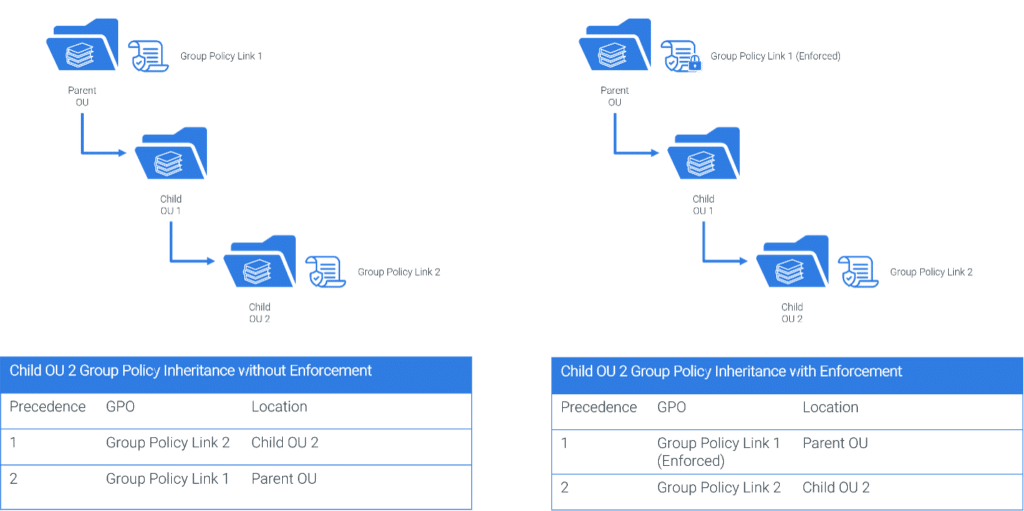
Figure 2 Group Policy Enforcement
Use Loopback Policy Only When Necessary
To improve GPO processing time and reduce logon delays, it is recommended to disable policy sections that contain no settings. However, when a policy includes user settings and Loopback Processing is enabled in Merge or Replace mode, those user settings will apply during computer configuration processing. This behavior can lead to unexpected configurations and complicates GPO management or troubleshooting efforts. Microsoft has outlined special-use cases for Loopback Policy in their article Group Policy processing for Windows | Loopback processing mode.
Avoid Linking GPOs to Sites
GPOs applied to an AD site impact all computers within that site, including client workstations, servers, and Domain Controllers (DCs). Because sites are replicated across all DCs in the forest, this can introduce challenges for clients in other domains. If those clients cannot access the DC hosting the policy, Group Policy processing time may increase significantly.
These challenges are further amplified when site and subnet mappings are not properly maintained in AD Sites and Services. User experience can also be negatively impacted if a subnet is not properly assigned to a site resulting in policies not being applied. Additionally, users who frequently move between sites may experience inconsistent policy behavior.
Avoid Linking GPOs across Domains
Similar issues to those seen with site-level policies can occur when GPOs are linked across multiple domains. If a GPO is deleted in the source domain, its Group Policy links in other domains remain, causing them to become orphaned. To avoid this, copy the GPOs to the other domains and manage them independently. It is also advisable to enable an audit policy within each domain to track GPO changes and link modifications, providing accountability and supporting faster root-cause analysis when issues arise.
Conclusion
Effective Group Policy management starts with a clear plan and is strongest when paired with a broader AD design philosophy. By incorporating principles such as a tiered access model, administrators can simplify policy ownership, preserve tiering boundaries, and reduce opportunities for unintended privilege escalation.
Applying the best practices in this guide helps keep policy scope predictable and troubleshooting straightforward. Regularly reviewing and retiring obsolete GPOs further improves processing time and reduces configuration drift.
A disciplined approach to Group Policy improves reliability, strengthens security posture, and delivers a more consistent experience for users and systems alike. If you don’t know where to start in the process of improving your Group Policy management, don’t hesitate to reach out to the experts at Ravenswood today.