




I love to fish. There is nothing more relaxing to me than being on a quiet pond in the early morning hours as the rising sun slowly burns off the last of the fog hovering over the water. There is a quiet calm that is only interrupted by the distinct plop of my lure hitting the water. I decided it was finally time for my youngest daughter to share this experience.
I have a pond at the back of my property that is the ideal place for some father-daughter bonding time. One day in the early morning hours as we walked to my secret spot, I explained to her the importance of placement and realism to make our lures look and act like the natural food sources of bass. After several attempts and a lot of coaching, she reeled in her first bass.
When I think about proactively hunting attackers in an enterprise IT environment, I think about the lessons I have learned when I am fishing. There are a lot of parallels to be drawn between fishing and proactively hunting attackers within an enterprise using Microsoft Defender for Endpoint (MDE) with Deception Technology. In both scenarios, success boils down to three key concepts: placement, realism, and patience. Mastering these concepts can turn a day of fishing into a day of catching, and a security strategy into a successful hunt.

In this post, I’ll show how Microsoft Defender’s Deception Technology lets defenders proactively hunt attackers by planting realistic lures—decoy files—across your environment. These lures are designed to attract malicious attackers and trigger high-fidelity alerts when the lures are interacted with. This, in turn, gives security teams an early warning of suspicious activity. By the end of this article, you’ll understand how to craft, place, and monitor lures using Defender for Endpoint, turning passive monitoring into active detection. If you are new to Microsoft Defender with deception technology, read my blog post entitled: Deception Technology Overview | Microsoft Defender XDR.
Placement: Where to Cast Your Lure
Wherever I go fishing, I always look for places where bass may lie in wait for unsuspecting prey. Structures provide cover and ambush locations and are where the target food source for bass is located. Just as you wouldn’t cast your line in the middle of a lake, you shouldn’t drop decoys at random locations in your network. Effective security, much like fishing, is all about placement.
One of the capabilities MDE deception technology has is the ability to deploy lures on targeted systems. Just like fishing, you shouldn’t drop your lures anywhere and expect a bite. MDE allows you to target a specific group of tagged devices to place a lure. This allows you to plant a lure in the most logical spots, such as on the laptops of key executives.
Realism: Making the Lure Irresistible
My favorite fishing lure is a rubber worm. These types of lures are often colorful and have lots of movement to catch the eye of a hungry bass looking for its next meal. I can manipulate it in such a way to make it wiggle and swim and look like the real thing. When done correctly, hungry bass can’t resist what looks like a tasty treat. A great lure looks and acts like the real thing; it must be so convincing that a predator can’t resist it.
Deception technology operates on the same principle. Lures must look convincingly real and irresistible. They should blend seamlessly into your environment, mimicking your naming conventions and typical files that would be stored on a device in various departments. Fake financial data lures should use the same naming convention and resemble real templates used in day-to-day operations. The more realistic the lure, the more likely an attacker will interact with it, triggering an alert.
MDE has the ability to deploy advanced custom lures that we create and upload to resemble the real thing. MDE has the ability to deploy advanced custom lures that we create and upload to resemble real documents. These tailored deception techniques allow defenders to present convincing fake assets that draw the attention of both external adversaries and potential insider threat actors carrying out malicious activity.
Patience: The Waiting Game
Fishing takes patience. That’s why they call it fishing instead of catching. You don’t catch something with every cast, even with the perfect lure and placement. You must be diligent and practice patience if you want to be successful. This is also true for the cyber defender.
You must be vigilant when hunting for attackers. Set the stage by targeting the right location and using realistic lures to entice attackers to bite. This is the hard part; now you must wait and observe. When an attacker finally takes the bait, a high-fidelity alert is triggered, whether it’s a cyber attacker moving laterally or an internal user accessing files they shouldn’t. This gives you the critical head start you need to investigate and neutralize the threat.
Planning a Strategy
Partner with Microsoft experts you can trust
If it’s time to take that first step toward leveling up your organization’s security, get in touch with Ravenswood to start the conversation.
In MDE, the most powerful lures are the custom rules and detections we craft that are so convincing that an attacker can’t resist. I will set up a scenario to show how the concepts of placement, realism, and patience are used as I deploy an advanced lure to demonstrate how it can be used to alert security teams to the presence of an attacker.
Let’s set up the scenario. I am a cyber defender working for Pirate Marine Chemicals tasked with proactively hunting threats within my company. All end user devices are enrolled in Microsoft Defender for Endpoint, and I have enabled Deception Technology in the DFE portal. I am creating a new rule targeting the finance department end user devices, and I want to be alerted if a bad actor is present before they can compromise sensitive information.
Placement
A prime target for any attacker is the finance department, as it holds sensitive data and access to financial systems. So, I’ll focus my efforts there.
Realism
I am going to craft a lure using existing company templates that mimic something a financial analyst would typically work with and store on a device within that department. This decoy needs to be so authentic that it not only attracts the attacker’s attention but also makes them believe they’ve stumbled upon a sensitive financial document. The moment they interact with it, I want a high confidence alert to be generated.
Patience
After I deploy the deception rules, I will wait and monitor any alerts generated from an attacker interacting with the lure.
Stocking the Tacklebox
The first step is to create a lure that will look interesting to an attacker. The lure I am using will be a company branded financial report template used within my fictitious company by members of the finance team. I have input fake values and names and watermarked it to make the lure look official and saved it with the enticing name of Q4 Financial Report.docx.

Casting the Line
Using the lure I created, I am now going to set up the deception rule within the Microsoft Defender portal and upload the file for deploying to a device in the Finance department.
If you need help with the initial set up, refer to Deception Technology Overview | Microsoft Defender XDR.
Step 1: Access the Deception Rules Portal
First, ensure Deception capabilities are enabled in your Microsoft Defender portal as described in my previous blog content. Then, navigate to the rules creation page.
- Go to the Microsoft Defender portal
- In the left-hand navigation pane, select Settings > Endpoints
- Under the General section, click on Deception rules
- Click the + Add deception rule button to begin creating your new lure
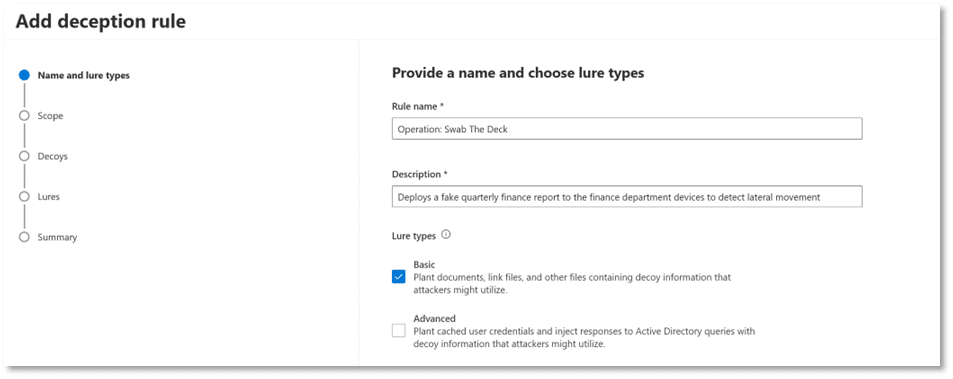
Step 2: Configure the Rule Details and Lure Type
This is where you give your rule a name and select the type of lure you’re building.
- Rule name: Enter a descriptive name. In my case, I created a rule called “Operation: Swab the deck.”
- Description: Provide a clear purpose, such as “Deploys a fake Financial finance report to the finance department devices to detect lateral movement.”
- Lure type: Select Basic lure types. This will allow you to upload your custom file. (If you select Advanced a note will be displayed that states “Custom lures management is available only when Basic lures are selected in “Details” step”)
Step 3: Define the Deployment Scope (Placement)
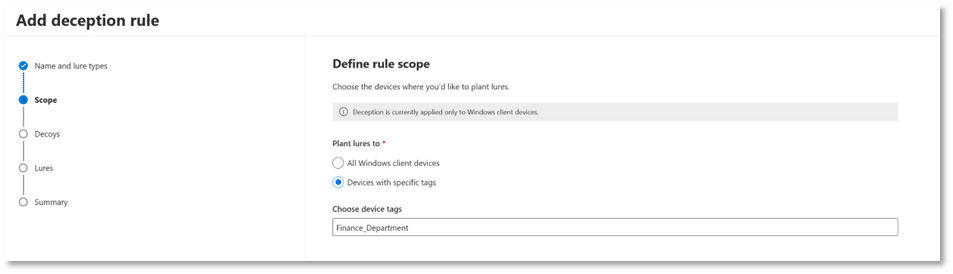
This is the “Placement” step. You will target the finance department devices as outlined in your scenario.
- In the Scope section, select Devices with specific tags.
- In the “Device tags” field, type and select the tag you have applied to your finance department’s devices (e.g., Finance_Department). This ensures that the lure is planted only on the intended systems. (If you need help creating and assigning device tags read this article in Microsoft Learn Create and manage device tags – Microsoft Defender for Endpoint | Microsoft Learn)
Step 4: Upload the Lure
This is the “Realism” step where we will upload the fake Q4 Financial report. For the purposes of this rule, I will accept the default decoy accounts and hosts.
- In the Decoys section, click Next to accept the default decoy accounts.
- In the Lures section, select Use custom lures only.
- Click Add new lure.
- File name: Upload the fake Q4 Financial report.
- File path: Specify the exact location where you want the file to be planted. In this case, I will use {HOME}\Documents to place the lure in the active user’s documents folder.
- Check the Plant on all devices in scope box and optionally the Plant as hidden box if you want the file to be concealed, making it seem like a secret waiting to be discovered.

Step 5: Review and Save
- Review all the details of the rule on the summary page.
- Click Save.
The rule is now active. It may take a few hours before Defender XDR begins deploying the Q4 Financial Report.docx file to the devices in the Finance_Department tag. Once it is delivered, the trap is set. When an attacker opens or accesses this file, a high-fidelity alert will be generated in the Microsoft Defender portal.
Detecting the Bite and Setting the Hook
Once the lure is deployed across the finance department’s workstations, the waiting game begins. This is the patience part. Just like fishing, we must wait and watch the line for a bite. We will know when we have a bite because a high confidence alert will be triggered when the file is interacted with.
To validate the setup, I created a test system and manually deployed the lure to it. Once the lure was planted, I navigated to the specified path and accessed the file to mimic an attacker. The moment the file was opened, Microsoft Defender for Endpoint sent a high-confidence alert near real-time, confirming that the deception rule was functioning as intended.
Reeling It In: Final Thoughts
Proactive threat hunting using Microsoft Defender’s Deception Technology is much like fishing — both require location, realism, and patience. By placing lures in high-value areas like, in our case, the finance department, crafting them with realism that mirrors authentic documents, and monitoring patiently for a bite, defenders can turn passive monitoring into active detection.
We walked through the full lifecycle of deploying a deception lure—from crafting a believable decoy to configuring deployment rules and lastly validating alerts. The process is deliberate and methodical, but when executed correctly, it transforms your security posture from reactive to proactive. Whether you’re casting into a quiet pond or into the depths of your enterprise network, the art of the lure remains the same: know where to find your target, draw them in using realistic lures, and exercise patience while being ready when they bite.
If you’re looking to elevate your cybersecurity strategy or optimize your Microsoft 365, Entra, Intune, or Active Directory environment, Ravenswood Technology Group is here to help. Our team of experts is ready to deliver tailored solutions that align with your business goals. Reach out today and let us help you secure your digital landscape.